


中国象棋js代码
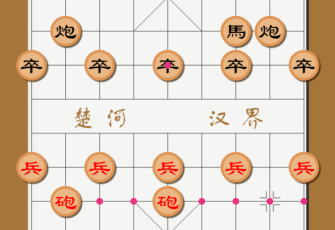
代码语言:html
所属分类:游戏
下面为部分代码预览,完整代码请点击下载或在bfwstudio webide中打开
<!DOCTYPE html>
<html>
<head>
    <meta charset="UTF-8">
    <title>BFW NEW PAGE</title>
    <script id="bfwone" data="dep=jquery.17&err=0" type="text/javascript" src="http://repo.bfw.wiki/bfwrepo/js/bfwone.js"></script>
    <script type="text/javascript">
        class Chess {
            constructor(canvasId) {
                this.canvas = document.getElementById(canvasId);
                this.ctx = this.canvas.getContext("2d");

                this.initCanvas();

                this.resetData();

            }

            // 重置数据,再来一局
            resetData() {
                this.redBottom = true; // 红方在下边(这个属性可以用来给不同的用户显示不同的棋盘)
                this.toMove = {};
                this.active = "red"; // 当前走棋方
                this.bottomColor = "red"; // 红方在下边
                this.chessSteps = []; // 走棋记录

                this.initChessBoard();
                this.initComposition();
                this.drawPieces();
            }

            // 切换走棋方
            exchange() {
                this.active = this.active == 'red' ? 'black': 'red';
                // this.reverseChess();
            }

            // 反转棋局数组
            reverseChess() {
                this.composition = this.deepReverse(this.composition);
            }

            // 渲染棋盘和棋子
            renderUi() {
                //清除之前的画布
                this.ctx.clearRect(0, 0, this.width, this.height);
                this.initChessBoard();
                this.drawPieces();
            }

            // 输赢判断
            getVictor() {
                var flag = false;
                for (let i = 0, len = this.composition.length; i < len; i++) {
                    for (let j = 0, len1 = this.composition[i].length; j < len1; j++) {
                        //              if(){
                        //
                        //              }
                    }
                }
            }

            // 初始化canvas并绑定点击事件
            initCanvas() {
                // var bodys = document.documentElement || document.body;
                var body = document.body;
                // console.log("%O",body);
                var h = body.clientHeight;
                var w = body.clientWidth;
                if (h > w) {
                    this.cellWidth = w / 10;
                } else {
                    this.cellWidth = h / 11;
                }
                this.width = this.cellWidth * 10;
                this.height = this.cellWidth * 11;
                this.canvas.width = this.width;
                this.canvas.height = this.height;

                // 绑定点击事件
                this.canvas.addEventListener("click", (e)=> {
                    var offset = this.canvas.getBoundingClientRect();
                    var x = Math.round((e.clientX - offset.left - this.cellWidth) / this.cellWidth);
                    var y = Math.round((e.clientY - offset.top - this.cellWidth) / this.cellWidth);
                    // console.log(x, y, "点击位置");
                    // 走棋
                    if (x >= 0 && x <= 8 && y <= 9 && y >= 0) {
                        this.goStep(y, x);
                        console.log(this.chessSteps);
                    } else {
                        console.log("点在其他地方,没在棋局中");
                    }
                }, false);

            }

            // 初始化棋盘
            initChessBoard() {
                //设置全局属性
                var padding = 2;
                var borderWidth = 5;
                var borderColor = "#333";
                var bgColor = "#a6753a";
                var lineColor = "#333";
                var fontColor = bgColor;
                var bgWidth = this.cellWidth - borderWidth - padding;


                // 画边框
                this.ctx.strokeStyle = bgColor;
                this.ctx.lineWidth = bgWidth*2;
                this.ctx.lineJoin = "miter";
                this.ctx.beginPath();
                this.ctx.moveTo(0, 0);
                this.ctx.lineTo(this.width, 0);
                this.ctx.lineTo(this.width, this.height);
                this.ctx.lineTo(0, this.height);
                this.ctx.closePath();
                this.ctx.stroke();

                // 画外边线
                this.ctx.strokeStyle = borderColor;
                this.ctx.lineWidth = borderWidth;
                this.ctx.lineJoin = "miter";
                this.ctx.beginPath();
                this.ctx.moveTo(0+bgWidth, 0+bgWidth);
                this.ctx.lineTo(0+this.width-bgWidth, 0+bgWidth);
                this.ctx.lineTo(this.width-bgWidth, this.height-bgWidth);
                this.ctx.lineTo(0+bgWidth, this.height-bgWidth);
                this.ctx.stroke();

                this.ctx.save();

                this.ctx.translate(this.cellWidth, this.cellWidth);
                this.ctx.beginPath();
                // 画横线
                for (let i = 0; i < 10; i++) {
                    this.ctx.moveTo(0, this.cellWidth*i);
                    this.ctx.lineTo(this.cellWidth*8, this.cellWidth*i);
                }

                // 画纵线
                for (let i = 0; i < 9; i++) {
                    this.ctx.moveTo(this.cellWidth*i, 0);
                    this.ctx.lineTo(this.cellWidth*i, this.cellWidth*4);
                    this.ctx.moveTo(this.cellWidth*i, this.cellWidth*5);
                    this.ctx.lineTo(this.cellWidth*i, this.cellWidth*9);
                }

                // 链接断线
                this.ctx.moveTo(0, this.cellWidth*4);
                this.ctx.lineTo(0, this.cellWidth*5);
                this.ctx.moveTo(this.cellWidth*8, this.cellWidth*4);
                this.ctx.lineTo(this.cellWidth*8, this.cellWidth*5);

                this.ctx.strokeStyle = lineColor;
                this.ctx.lineWidth = 1;
                this.ctx.stroke();

                // 写(楚河、汉界)汉字
                this.ctx.font = `${this.cellWidth*0.75}px 方正舒体`; // 隶书  方正舒体
                this.ctx.fillStyle = fontColor;
                this.ctx.textBaseline = "middle";
                this.ctx.textAlign = "center";
                this.ctx.fillText("楚", this.cellWidth*1.5, this.cellWidth*4.5);
                this.ctx.fillText("河", this.cellWidth*2.5, this.cellWidth*4.5);
                this.ctx.fillText("汉", this.cellWidth*5.5, this.cellWidth*4.5);
                this.ctx.fillText("界", this.cellWidth*6.5, this.cellWidth*4.5);

                // 画炮位
                var paoArr = [{
                    x: 1, y: 2
                }, {
                    x: 7, y: 2
                }, {
                    x: 7, y: 7
                }, {
                    x: 1, y: 7
                }];
                for (let i = 0, len = paoArr.length; i < len; i++) {
                    this.markP(paoArr[i].x, paoArr[i].y);
                }
                // 画兵和卒位
                var bingArr = [];
                for (let i = 0; i < 9; i += 2) {
                    bingArr.push({
                        x: i, y: 3
                    });
                    bingArr.push({
                        x: i, y: 6
                    });
                }

                // 画皇宫
                this.ctx.beginPath();
                this.ctx.moveTo(this.cellWidth*3, 0);
                this.ctx.lineTo(this.cellWidth*5, this.cellWidth*2);
                this.ctx.moveTo(this.cellWid.........完整代码请登录后点击上方下载按钮下载查看


热门代码搜索

其他语言代码库
Html代码库
Python代码库
Java代码库
Php代码库
Phpcli代码库
Golang代码库
C#代码库
Nodejs代码库
C代码库
C++代码库
Sql代码库
R代码库
Rust代码库
Ruby代码库
Dart代码库
Vb代码库
D代码库
F#代码库
Typescript代码库
Coffeescript代码库
Julia代码库
Kotlin代码库
Perl代码库
Groovy代码库
Lua代码库
Vala代码库
Ocaml代码库
Assembly代码库
Objectc代码库
Scala代码库
Erlang代码库
Pascal代码库
Swift代码库
Fortran代码库
Bash代码库
Clojure代码库
Ada代码库
Elixir代码库
Cobol代码库
Haskell代码库
Nim代码库
Racket代码库
Lisp代码库


网友评论0